

Table of Contents
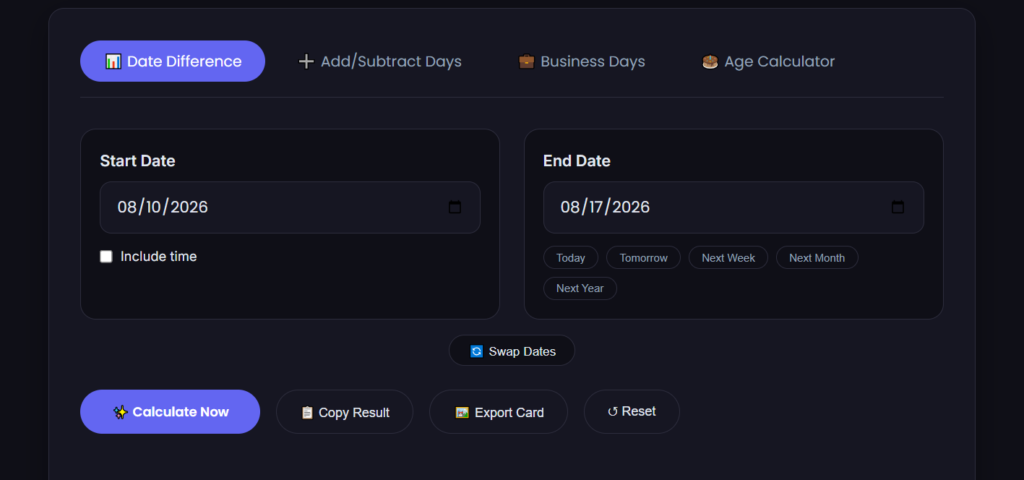
Date calculator between two dates
If you need to know exactly how many days sit between two dates—for a contract term, a legal deadline, or a project milestone—you calculate the difference by subtracting the earlier date from the later date. That gives you the total calendar days. From there, you can adjust the count to exclude start dates, count only business days, or convert the result into weeks and months, depending on what your contract or deadline actually requires.
It sounds simple, and at its core, it is. The tricky part is knowing which days to count and which rules to apply. A mistake of just one day can mean a missed statute of limitations, a late filing penalty, or a contract that accidentally expires a day early.
Why Date Math Goes Wrong (Even When People Try)
The reason "just subtract the dates" trips people up isn't the arithmetic. It's the unspoken rules layered on top.
- Start date inclusion. If a contract says "within 30 days of signing," does the signing day count as day zero or day one? Different jurisdictions and industries handle this differently. When in doubt, check the governing law clause or ask whoever drafted the agreement.
- End date on a weekend or holiday. Many contracts and court rules push a deadline to the next business day if it falls on a Saturday, Sunday, or public holiday. You need to know whether your jurisdiction observes that rule before you mark the calendar.
- Month definitions. A "month" in a contract isn't always 30 days. If a 12-month agreement starts on January 15, does it end on January 14 or January 15 of the following year? Usually, it ends on the day before the anniversary date, but I'd always verify against precedent from the same governing law.
- Leap years. A period defined as "365 days" will end one calendar day earlier than a period defined as "one year" if a February 29 falls inside the term.
Most people don't get the math wrong. They get the counting convention wrong. That's why using a dedicated date calculator between two dates helps: it removes the calendar-counting friction so you can focus on which rules to apply, instead of double-checking whether you miscounted July 31 to August 1.
A Worked Example: Contractor Payment Terms
Let's ground this in a realistic scenario. You're a freelance developer, and your contract says:
Invoices must be submitted within 15 calendar days of project completion. Payment is due 30 calendar days after the invoice date.
You finished the project on March 3, 2026 (a Tuesday). When is the invoice deadline, and when should you expect payment?
Step 1: Find the invoice submission deadline
You start counting from the completion date. The contract says "within 15 calendar days of completion." The word "of" often means the completion date itself is day zero, but a safer reading (and the one I'd recommend unless the client confirms otherwise) is that day one is March 4, the day after completion.
If we count March 4 as day 1, then day 15 lands on March 18, 2026. That's your invoice submission deadline.
Step 2: Assume you invoice immediately
If you submit the invoice on March 18, the 30-day payment clock starts. Payment is due 30 calendar days from March 18.
Counting March 19 as day 1, day 30 lands on April 17, 2026. That's a Friday, so no weekend adjustment is needed.
Step 3: The actual number of days from completion to payment
Now, looking at the big picture: from project completion (March 3) to the expected payment date (April 17), the total span is 45 calendar days. That's the real-world cash-flow gap you'd plan around.
When you're modeling multiple contracts at once, running those dates through a date calculator between two dates is much faster than counting on a calendar. You can punch in March 3 and April 17 and get an instant read on the total days—then adjust for business-day logic if your payment terms use banking days instead of calendar days.
Counting Deadlines: Calendar Days vs. Business Days
Not all deadlines are measured in calendar days. Many legal, government, and financial deadlines exclude weekends and public holidays. That's where a separate deadline calculator approach comes in—or at minimum, a careful set of rules.
If a court filing is due "14 days after service of notice," and the 14th day lands on a Sunday, U.S. federal rules (and many state rules) bump the deadline to Monday. But if that Monday is a federal holiday, it bumps again to Tuesday.
The safest workflow:
- Count the calendar days first, using a reliable tool so you don't make a dumb subtraction error.
- Look at where the date falls on the week.
- Apply your jurisdiction's weekend and holiday rule.
- Record both the natural deadline and the adjusted deadline, with a note explaining why you adjusted it. Future you (or your lawyer) will thank you.
Practical Contract Clauses Where Exact Day Counts Matter
Some contract clauses are obvious candidates for date math. Others can catch you off-guard.
Term and Termination. If a one-year contract starts April 1, 2026, the "one year" point is typically March 31, 2027. But if the contract says "for a period of 365 days," the end date would be March 31 as well, because 2026–2027 doesn't include a February 29. If the term crosses a leap year and the contract specifies "365 days" while the other party assumes a standard anniversary date, you've got a one-day discrepancy. Clarify it before signing.
Notice Periods. A 90-day notice period from receipt of written notice can get messy. If notice is delivered February 27, 2026, 90 calendar days later is May 28, 2026. But if only business days count, you're looking at roughly 18 weeks, pushing the deadline well into July. Always check whether the contract defines "days" as calendar or business days.
Earnest Money and Contingency Periods in Real Estate. A purchase agreement might give a buyer 10 days after acceptance to complete inspections. If acceptance happens on a Friday, does the 10-day clock run through two weekends? Usually, yes, unless the contract specifies business days. Counting this wrong can cost a buyer their inspection right or their earnest money.
Statutory Deadlines. Government comment periods, FOIA response windows, and administrative appeal deadlines are often defined by statute. Those dates are non-negotiable. Misreading the statute's counting language can throw an entire case out before it begins.
In every one of these scenarios, I use a dedicated tool rather than trying to do mental math. For straight calendar-day counts, the date-to-date calculator at MiniToolsPro gives you the difference instantly, so the only thing you need to worry about is which counting convention applies.
How to Handle Month-Based Deadlines Without Guessing
"Six months from now" doesn't have a fixed number of days. It depends on where you start. Add six months to:
- January 31, 2026 → July 31, 2026 (straightforward, both months have 31 days)
- March 31, 2026 → September 30, 2026 (September has only 30 days, so the date snaps back to the last day of the month)
- October 31, 2026 → April 30, 2027 (same snap-back logic)
Most legal agreements handle this with a "same day of the month" rule, and if that day doesn't exist in the target month, it falls on the last day of the month. But not always. I've seen finance agreements where a month is defined as exactly 30 days regardless of the calendar, which shifts deadlines by one or two days versus the natural month-end.
Month math is where I stop doing manual calculations entirely. I plug the start date into a calculator, add the exact number of days specified, or work with the actual calendar date the tool gives me, rather than trying to mentally adjust for 30- vs. 31-day months.
Time Zones and the "Midnight Problem"
This is a detail most blog posts skip, but you'll run into it the moment a contract involves parties in different time zones.
If a deadline is "by 11:59 PM on July 15, 2026," whose midnight matters? The sender's? The recipient's? UTC? If the contract doesn't specify, a counterparty on the U.S. West Coast might reasonably think they have until nearly 3 AM Eastern Time to hit "send." Whether that holds up depends on the governing law and the relationship history between the parties.
Most pure day-count tools don't involve time zones at all—they work with calendar dates, not timestamps—so this issue only matters at the moment of delivery. But it's worth flagging because a correct date difference calculation can still end up being useless if the deadline wording is ambiguous on time.
FAQ
How do I calculate the number of days between two dates?
Count the days from the start date (or the day after the start date, depending on your terms) to the end date, inclusive or exclusive as required. Using a date calculator between two dates skips the manual counting and gives you the exact result instantly. For most contracts, you'll want the calendar-day total first, then adjust for any business-day rules.
Does a deadline that falls on a weekend move to Monday?
In many legal and business contexts, yes—the deadline rolls to the next business day. In the U.S., federal rules and many state courts follow this convention, as do a lot of commercial contracts. But it is not automatic. Always check the specific contract language or statute. Some processes (like certain banking cutoffs or tax filings) don't observe the Monday rule at all.
What's the difference between calendar days and business days in a deadline?
Calendar days count all days, including weekends and holidays. Business days count only Monday through Friday, often excluding recognized public holidays. A 10-calendar-day deadline is about one and a half weeks. A 10-business-day deadline is roughly two full weeks. The difference can shift a deadline by 4-5 days or more, so it's critical to know which definition your contract uses.
When to Stop Counting Manually
You can absolutely work all of this out with a desk calendar and a highlighter. But if you're juggling multiple contracts, multi-jurisdiction deadlines, or long-term projects where one mistake could cost you real money, manual counting isn't worth the risk.
I use the MiniToolsPro Date-to-Date Calculator for the straight number-of-days part of the process. It gives me the raw count I need, and then I layer on the legal or contractual rules manually—because those are judgment calls, not math problems. The tool handles the arithmetic so I can think about what the numbers actually mean for the deadline.
For date difference scenarios that only count working days, take a look at our business day calculator post next.
If you're just getting comfortable with counting days across months and years, we've also put together a straightforward guide on how date calculators work—no rush, it's there if you want the bigger picture.
Share this article 👇


0 Comments